Troubleshooting and fixing build failures
Build failures can be VERY frusturating, so here, we break down most failures and how to fix them properly. Start by grabbing the real error line from the log, then match it to a fold-out listed later in this page.
The fold-outs are grouped by build stage (prep, dependencies, configure, build, install, check, files), plus bootstrap loops, language stacks, arch differences, and chain quirks. A missing tool or file means add the real package. A warning means fix the code. Keep tests, LTO, docs, and -Werror on, and fix the underlying issue.
The page is long. Hit Ctrl+F (Cmd+F on macOS) and search for part of the error line, a tool name, or a path.
Finding the log
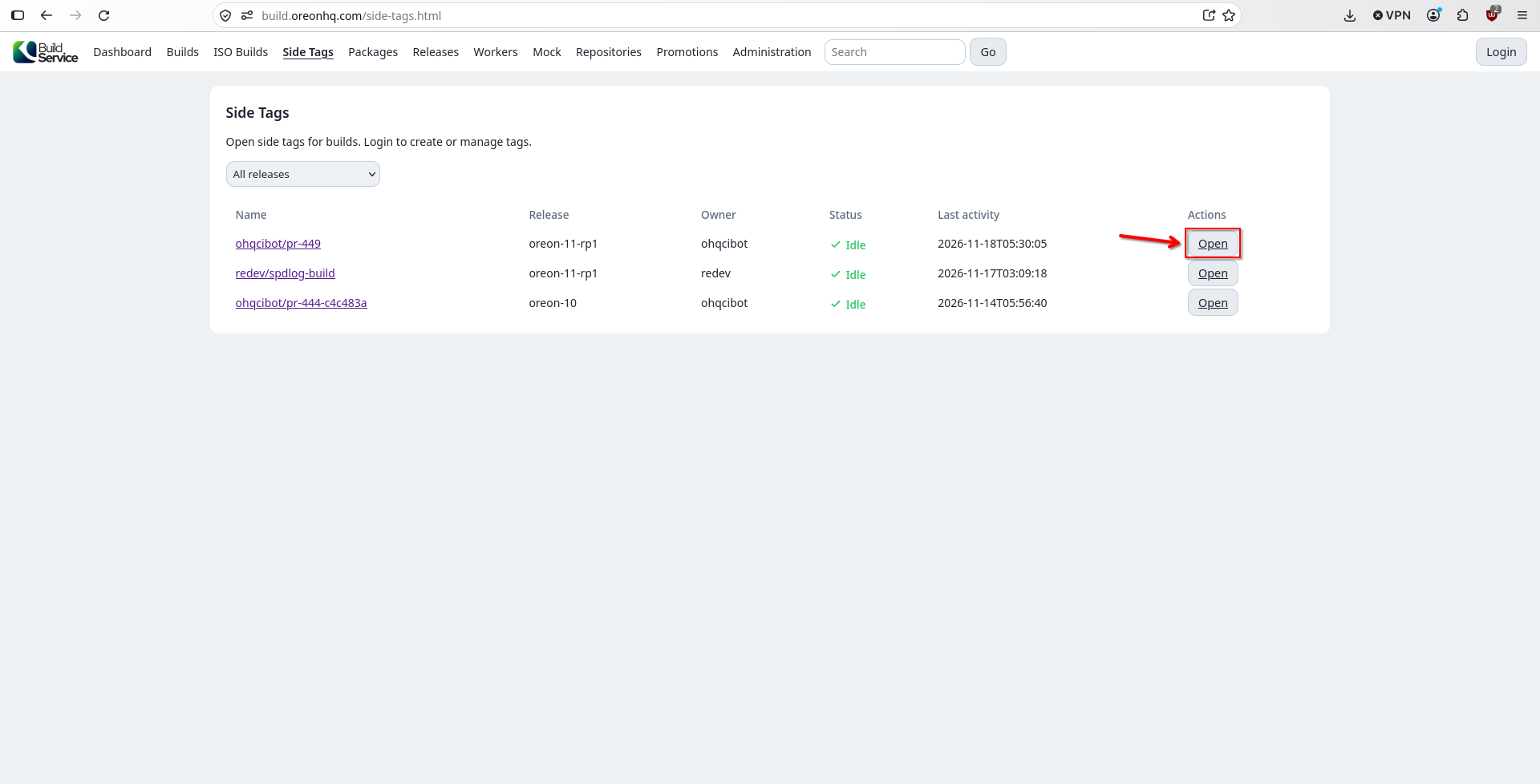
From the Oreon Build Service web interface, open Side Tags, find your tag, and click Open.
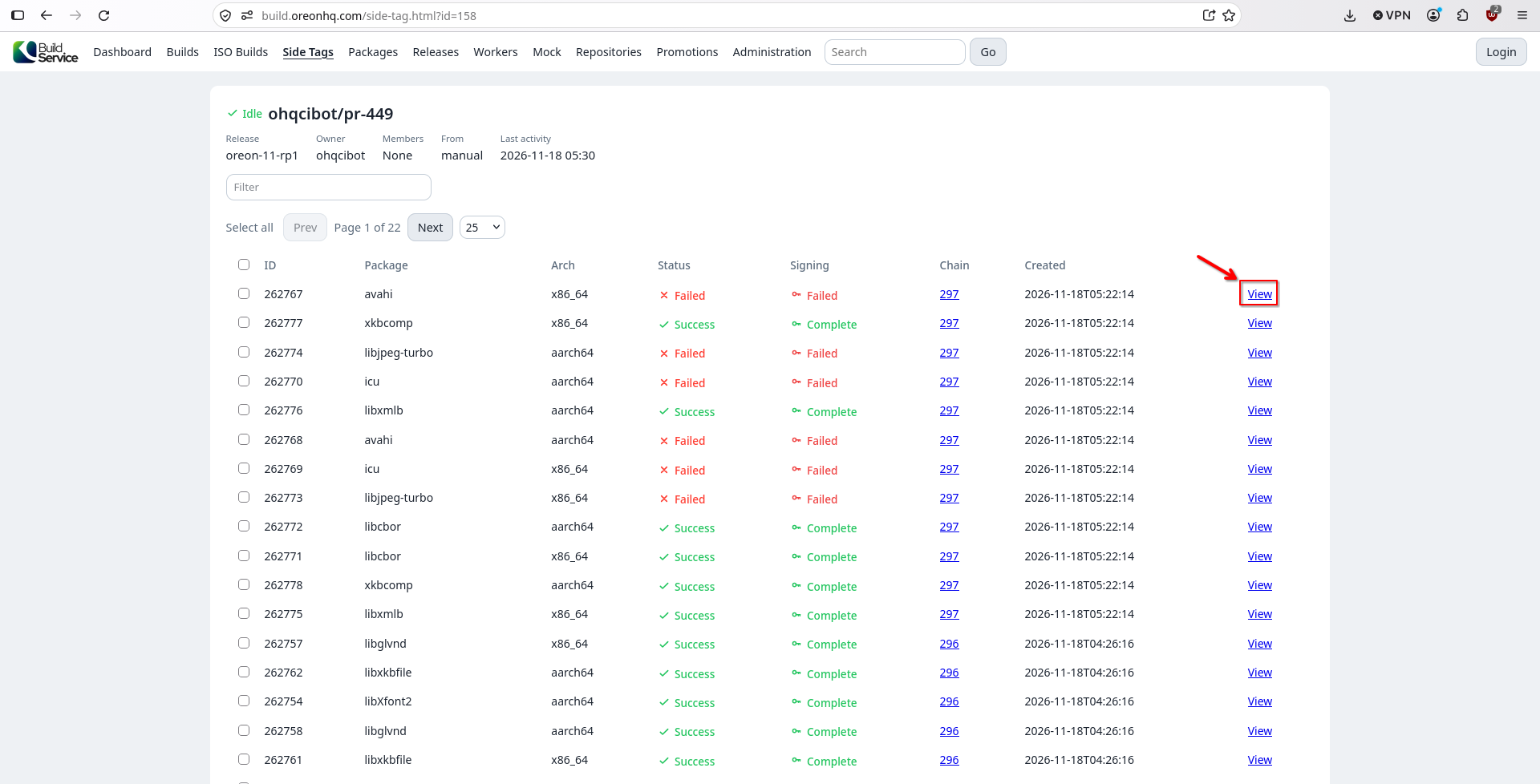
In the tag, click View on a failed package.
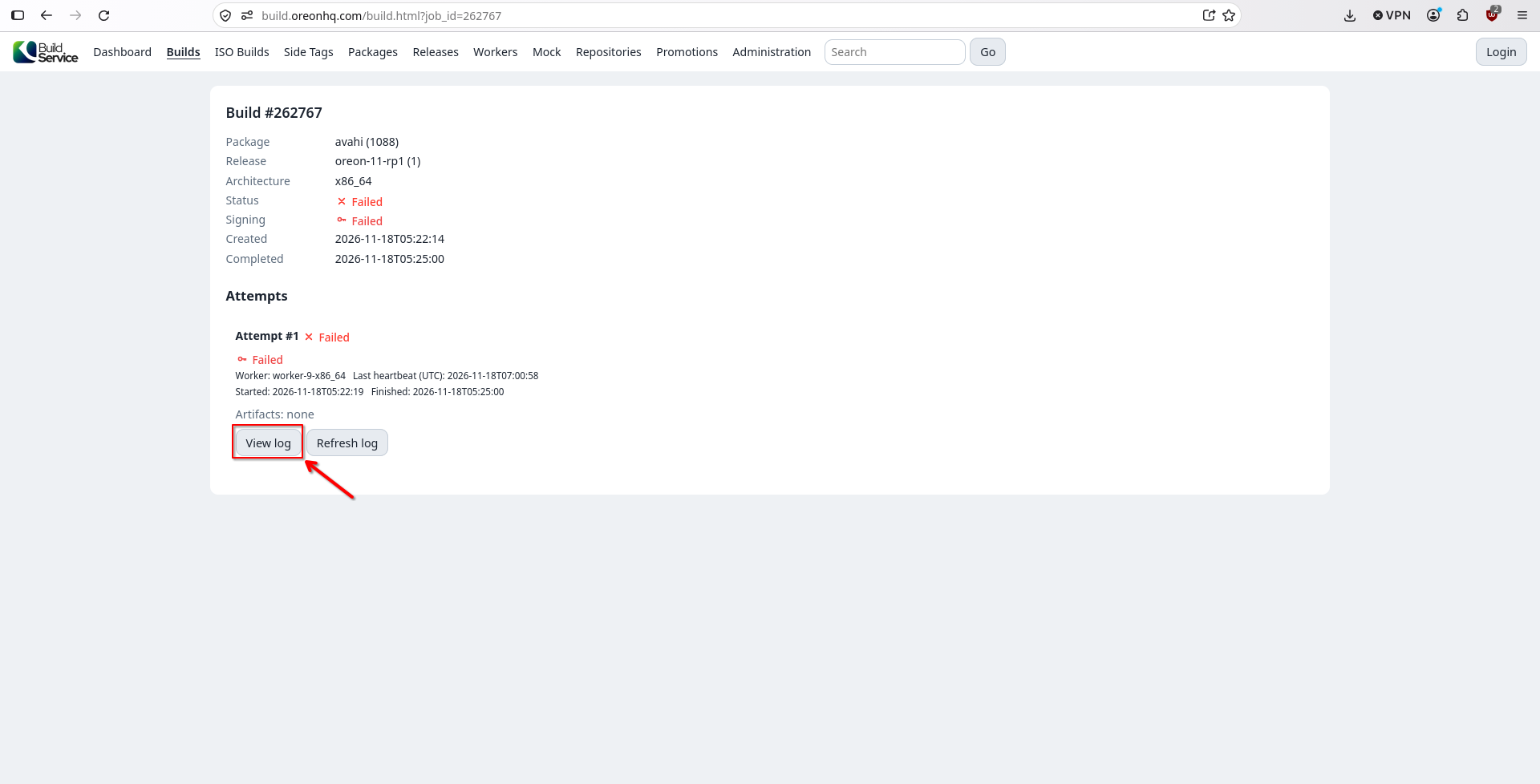
On the build page, open the failed attempt and click View log.
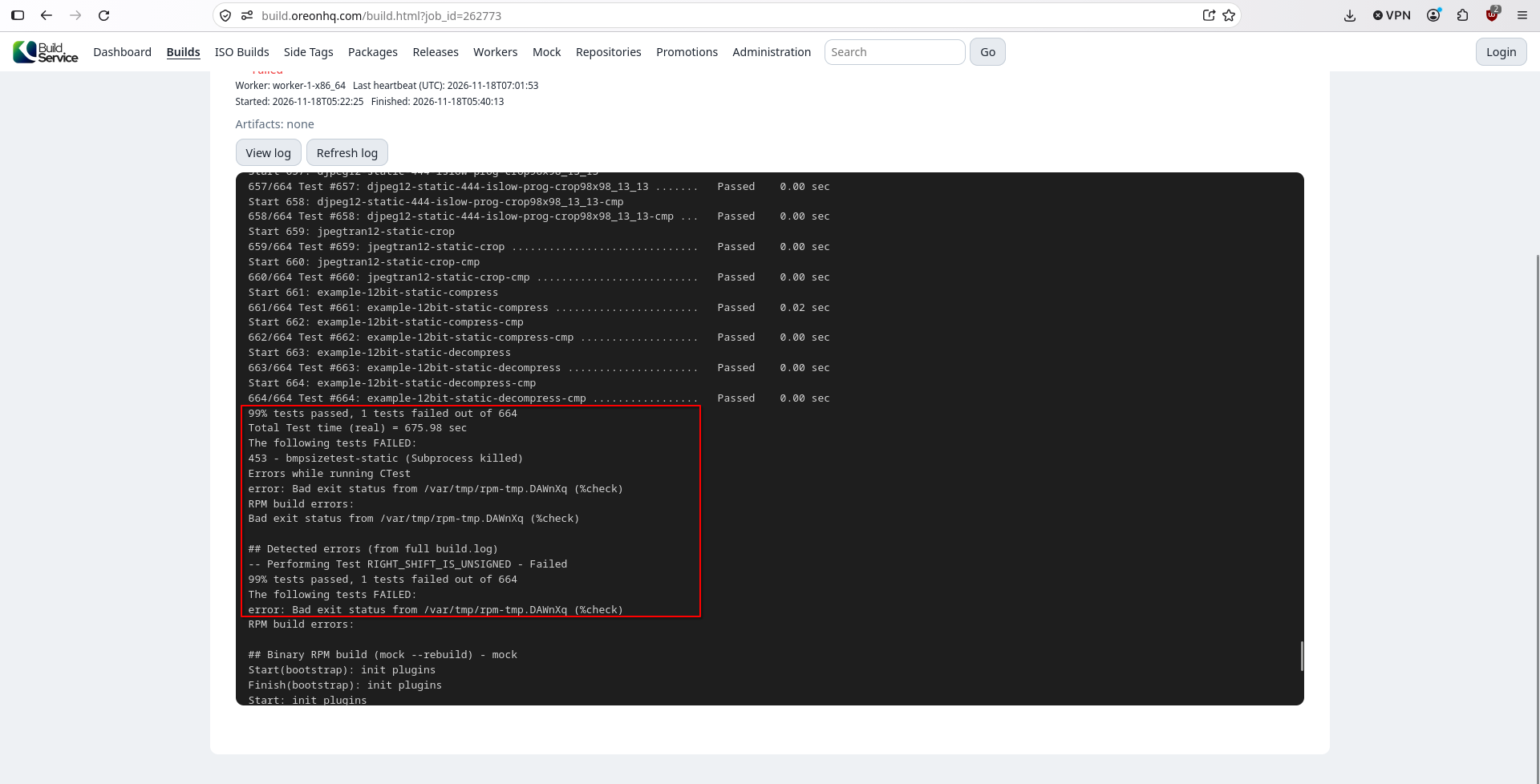
Scroll to the error. The useful bit is usually near ERROR: Command failed or Bad exit status for a section like %check.
What to look for
Scroll up from ERROR: Command failed until the section header changes. Edit that section of the spec. The nspawn command under the header is the same on every failed build, so skip it.
| Log text | Spec section |
|---|---|
Executing(%prep) | %prep |
BuildRequires resolve, or dnf installing packages | BuildRequires |
Executing(%build) | %build |
Executing(%install) | %install |
Executing(%check) | %check |
Installed (but unpackaged) or File listed twice or File not found | %files |
File must begin with "/" | a macro in %files or %install |
error: Failed build dependencies before prep | BuildRequires |
No matches found for / nothing provides | BuildRequires name or missing package in the tree |
Before you edit, expand the spec the way the build worker does:
rpmspec -P oreon-11-rp1/<name>/<name>.spec | less
If a line you expected never shows up, it is inside an %if that did not match, or a macro expanded to nothing. The build worker will not run it. orbscli lint the spec after you change it.
In the case of troubleshooting, bump Release in the spec only when a version already built successfully but needs additional fixes. A package that has never produced a build can keep the same Release.
See the bottom for non-solutions.
Prep
cp / cd / open: No such file or directory right after autosetup
Problem:
%autosetup -n is the directory after unpack, and later cd / cp paths are relative to it. A GitHub archive/refs/tags/ URL unpacks the git tree, which is often one directory deeper than the upstream release tarball of the same version (ICU keeps sources in icu4c/source).
Solution:
Look at the paths patch -p1 printed. If they start with icu4c/source/, point cp and cd there. If you switch Source0 to the release tarball, download it, update source0_hash, and re-check the patch paths because they follow the layout.
%oreon_sha256 fails / digest mismatch
Problem:
The hash in the spec does not match the file the build worker downloaded from Source0.
Solution:
Download that Source0 URL yourself and hash those bytes. Change the URL and the hash together. Keep patches next to the spec and keep the tarball on the upstream URL.
URL 404s after a %global that uses the version
Problem:
A %global that shells out on %\{version\} sits above the Version: line, so the shell stores the characters %\{version\} and the download 404s.
Solution:
Put that %global under the Version: line, or hardcode the version number in it.
patch: **** malformed patch / hunk FAILED / fuzz
Problem:
The patch was written against a different tree than the current Source0.
Solution:
Re-diff against the tarball you actually download, or change -p so the strip level matches the paths in the patch. %autosetup -p1 is the usual strip. If only some hunks fail, refresh the patch for this upstream version.
gzip / xz / tar: not in gzip|xz|zstd format
Problem:
The URL returned an HTML error page or a redirect landing page instead of the archive.
Solution:
Open the URL in a browser or run curl -IL on it, fix Source0, then hash the file you get from a real download.
%setup / %autosetup: directory not found / wrong -n
Problem:
-n does not match the top-level directory inside the tarball, so every later command runs in the wrong place.
Solution:
List the archive with tar tf and set -n to that directory name. GitHub archives are often project-tag or project-version.
gpg / signature verification failed
Problem:
The keyring or signature Source is stale, expired, or replaced upstream.
Solution:
Update the keyring Source and the signature Source together, and verify the signature locally before you push.
Dependencies and installdeps
bash: line 1: /usr/bin/rpmbuild: No such file or directory
Problem:
The build never reached %prep. dnf quit while installing BuildRequires, the chroot never got rpmbuild, and the installdeps section is often blank because that dnf error never ended up in the log. Something you named requires a package that is not in the repo yet.
Solution:
Dump Requires from the published primary and add the missing packages as BuildRequires, one per line:
zstd -dc primary.xml.zst | python3 -c '
import sys, xml.etree.ElementTree as ET
ns={"r":"http://linux.duke.edu/metadata/common","rpm":"http://linux.duke.edu/metadata/rpm"}
want=sys.argv[1]
for ev,el in ET.iterparse(sys.stdin.buffer, events=("end",)):
    if el.tag.endswith("package"):
        name=el.find("r:name", ns)
        if name is not None and name.text==want:
            fmt=el.find("r:format", ns)
            for req in fmt.findall("rpm:requires/rpm:entry", ns):
                print(req.get("name"), req.get("flags") or "", req.get("ver") or "")
        el.clear()
' doxygen
Published doxygen needed graphviz, and js-doxygen needed web-assets-filesystem. Those specs were in the tree and had never been built. generate-chain only orders dependencies written on your spec, so write them on the spec.
nothing provides ... / No match for argument
Problem:
The dependency name is wrong, the package is missing from this release tree, or nobody Provides that capability yet.
Solution:
Search the tree for Name: and Provides:. pkgconfig(foo) only works when some spec has Provides: pkgconfig(foo). Fix the name, add the missing package, or add the Provides on the subpackage that installs the .pc file. Keep the dependency on a real BuildRequires / Requires line the planner can see.
package X requires Y, but none of the providers can be installed / file conflict
Problem:
Two packages own the same file, or a Conflicts / Obsoletes line is wrong.
Solution:
Find the two owners and drop the extra BuildRequires, or fix the file lists so only one package owns the path. Extra version pins on top of a file conflict usually make the solver worse.
(foo if bar) soft dependency never got pulled in
Problem:
Weak deps only install when the condition package is present, and the build still needs the files from the weak dep.
Solution:
Add an explicit BuildRequires for the package and for what it requires. (js-doxygen if redhat-rpm-config) is true here because oreon-rpm-config provides redhat-rpm-config, and you still need js-doxygen named on the spec.
Xvfb / dot / convert / gtk-doc / xsltproc / msgfmt / gperf / bison / flex: command not found
Problem:
The tool is missing from the build root.
Solution:
BuildRequires the package that owns the binary. On a system that has it, rpm -q --whatprovides $(which TOOL) names the package, or search the tree. Add that real package so later builds get a working tool too.
Can't locate Foo.pm in @INC / ModuleNotFoundError / cannot find crate / go: module not found
Problem:
A language module the build or tests import is missing from the build root.
Solution:
Name it the way this tree packages it. Perl is often perl(Foo::Bar). Python is python3-foo or python3dist(foo). Rust and Go deps belong on the lines spec-add / spec-bump generate from the 2rpm tools. If the module is missing from the tree, add that package (or use the project's existing vendor tarball).
Conflicts: pkg < 1:2.0 matches the package you just built
Problem:
The conflict line has an epoch. Oreon packages often have none, so rpm reads yours as 0:x.y and 0:x.y < 1:2.0 is true.
Solution:
Use the epoch the package actually has. With no epoch, write pkg < 2.0.
Headers / .pc files missing after installing into the buildroot
Problem:
pkg-config --cflags drops -I/usr/include when PKG_CONFIG_SYSROOT_DIR is unset, so a compile against a library you just installed into the buildroot misses the headers. Or the .pc file was never installed.
Solution:
Set both variables when you compile against the buildroot copy:
export PKG_CONFIG_PATH="%{buildroot}%{_libdir}/pkgconfig"
export PKG_CONFIG_SYSROOT_DIR="%{buildroot}"
If the .pc itself is missing, install the devel package or list the .pc in that package's %files.
BuildRequires works on my laptop but not on the build worker
Problem:
Your laptop already has tools installed that the mock root does not.
Solution:
Put every tool, header, and macro the build uses in BuildRequires, including oreon-rpm-macros (except on that package itself) and gdb when find-debuginfo runs gdb-add-index.
Configure, Meson, CMake, Autotools
configure: error: ... not found / Package requirements were not met
Problem:
A probe looked for headers or a .pc file that is missing from the build root.
Solution:
Read config.log or the meson log a few dozen lines above the stop for the exact probe, then BuildRequires the matching -devel package. A runtime library package alone will leave the probe failing.
Meson: Dependency ... not found / Program ... found: NO
Problem:
%meson passes --auto-features=enabled, so features you never named turn on and ask for tools you never BuildRequired.
Solution:
Set the option explicitly. If that tool depends on the package you are building, turn the option off only for the bootstrap build with %\{with bootstrap\}, and leave it on for the final build with the feature still compiled into the library users install.
CMake Error: Could not find ... / find_package failed
Problem:
CMake cannot find a dependency or config package.
Solution:
Pass -DFOO=ON/OFF yourself and BuildRequires the package that provides the CMake config file. For RPATHs into /usr/lib64, configure with -DCMAKE_SKIP_INSTALL_RPATH:BOOL=ON.
unknown option / unrecognized option to configure or meson
Problem:
The flag was removed or renamed upstream for this version.
Solution:
Check the tarball's meson_options.txt, CMakeLists.txt, or ./configure --help, then update the spec to the current option names.
compiler cannot create executables / C compiler cannot create shared libraries
Problem:
The toolchain is incomplete, or flags point at a sysroot that does not exist.
Solution:
Confirm the buildroot has the clang / LLVM toolchain (plus binutils or lld as used here), and drop accidental cross-triple flags.
Clang warns about unused -specs=... / unknown warning option, then keeps compiling
Problem:
gcc-only flags were handed to clang. The next [N/M] Building line means the compile continued.
Solution:
Strip those gcc-only flags when the package builds with clang, then keep reading for the real failure further down.
-- Performing Test FOO - Failed during CMake probes
Problem:
CMake is probing for a flag. If configure continued, this is noise.
Solution:
Treat configure as failed only when the configure step exited. Trust orbscli why over a chain page search for the word Failed.
Build and link
error: ... [-Werror=...] / lto1: all warnings being treated as errors
Problem:
A warning is treated as an error. Oreon builds with clang / LLVM LTO by default, and the warning can stay quiet through every object and only show up at link once something was inlined. Notes like inlined from (or the clang equivalent) name that function.
Solution:
Fix the warning in that function. If the store is obviously there and the compiler still cannot see it through LTO, stop inlining that one function. Leave -Werror on for the rest of the package.
Compile line contains -Werror=format-security but no real error:
Problem:
That text is the compiler flag, which happens to contain the word error.
Solution:
Keep scrolling until you see a line with error:.
undefined reference to ... at link time
Problem:
A library is missing from the link line, a .so was never built, or the devel package that provides the symbol is absent.
Solution:
Check the project's build files for the intended library name, BuildRequires that devel package, and make sure its %files lists the .so.
collect2: fatal error: ld terminated with signal 9 / cc killed
Problem:
The link was OOM-killed, often while two huge trees sat in memory during PGO or a very parallel LTO link.
Solution:
Lower parallelism for that package (%\{_smp_mflags\} overrides, or a lower -j on the heavy target). Delete a throwaway instrumented tree after you copy result.profdata. Keep LTO on the final package.
No space left on device / error opening .o.d
Problem:
The disk filled up. Huge packages like llvm are the usual case.
Solution:
Compress debug info with -gz=zstd where the package already supports it, and delete throwaway trees once you are done with them. Keep LTO on the installed build.
Log cuts off mid-compile with no error:
Problem:
The build worker keeps about the first 5MB of the log, so the real stop is missing from what you downloaded.
Solution:
Quiet successful compiles (log them to a file, print the last lines only on failure) and build again until the captured log contains error:.
fatal error: SomeHeader.h: No such file or directory
Problem:
The compiler cannot find a header.
Solution:
BuildRequires the package that owns the header, or fix the include path. If this package generates the header in an earlier subdir, fix the internal build order so that output exists before it is used.
error: #error / static_assert failed / Feature was not enabled
Problem:
Upstream expects a configure option or dependency that the spec turned off.
Solution:
Turn the feature back on and add the real dependency so the library builds complete.
Install
make install / meson install / cmake --install fails on permission or missing directory
Problem:
Install wrote outside %\{buildroot\}, or the destination directory was never created.
Solution:
Use %make_install, %meson_install, or %cmake_install so files end up under %\{buildroot\}.
file not found by glob / cp: cannot create
Problem:
The build did not produce that path. The feature that creates it may be off, you may be in the wrong directory, or the path moved in this version.
Solution:
Fix the build so the file exists, then list it in %files.
gdb: command not found / GDB exited with exit status 127
Problem:
find-debuginfo is running gdb-add-index and gdb is missing from the build root.
Solution:
Add BuildRequires: gdb.
Could not open the files list debugsourcefiles.list
Problem:
find-debuginfo wrote the list somewhere else than rpm expected. A %global copied from a debug install script expanded %\{buildsubdir\} at the top of the spec while it was still empty.
Solution:
Use %define so the path is filled in when install actually runs.
Python: No module named pip / pyproject build cannot run
Problem:
The pyproject build needs pip or another build frontend that is missing from the build root.
Solution:
Add BuildRequires: python3-pip, plus whatever else that build needs (python3-build, python3-setuptools, and the same idea for poetry or hatchling).
shebang / /usr/bin/env python looks wrong after brp scripts
Problem:
A script shebang still points at a generic /usr/bin/env python after the brp rewrite pass.
Solution:
Let the Python packaging macros rewrite shebangs, or point a private script at %\{__python3\} / the path those macros already use for this release.
Check and tests
Bad exit status from /var/tmp/rpm-tmp.* (%check)
Problem:
That line only names the section. The real failure is further up.
Solution:
Scroll up to the first real FAIL, ERROR, FAILED, or assertion, then fix that test or its environment.
FAILED (errors=N) / N failed tests
Problem:
The number is only a count of how many tests failed.
Solution:
Read the first failing test name and file, then fix those failures with %check still running.
No display! / cannot open display / gtk init failed
Problem:
XOpenDisplay ran with DISPLAY unset. A later glXQueryServerString / glXCreateContext failure means Xvfb was built without GLX.
Solution:
BuildRequires the package that installs Xvfb (and xkbcomp when the suite needs it), wrap the suite with xvfb-run, and build that Xvfb with GLX enabled.
GLX / X11 tests need a server that needs this library
Problem:
The library's tests need Xvfb, Xvfb needs mesa/libglvnd, and mesa needs the library.
Solution:
Build the library once with the display tests behind %\{without bootstrap\}, publish it, build the server, then rebuild the library with the display tests under xvfb-run. Keep the feature compiled into the library on both builds. Only the test and the server BuildRequires move behind the bootstrap gate.
Subprocess killed***Exception / signal 9 during a test
Problem:
453/664 Test #453: bmpsizetest-static  Subprocess killed***Exception: 1362.81 sec
Testing PPM reader ...
That is signal 9. ctest prints Timeout for its own limit and SegFault for a segfault, so this has been the OOM killer. The seconds change between runs. stderr is often block buffered through rpm's pipe, so the last line can be a banner from a case that already finished.
Solution:
Print the case name and fflush(stderr) if you need the real spot, then build again. Run racy or memory-heavy suites with -j1 (%ctest --parallel 1, and check that nothing later on the command overrides it). Fix the allocation or the test's upper bound so the process fits, with the test still in %check.
Timeout / test hung
Problem:
The harness hit its time limit, or the test wedged on a lock or missing service.
Solution:
Run racy tests with -j1 first. Raise the harness timeout only when the test is still making progress. For network services mock does not run, use upstream's offline mode or start a local test server in %check.
SegFault / core dumped in a test
Problem:
The test crashed. An @unittest.expectedFailure that starts passing becomes UNEXPECTED SUCCESS and still fails the suite.
Solution:
Run the single test under gdb in a local mock if you can, or add logging around the assertion, then fix the crash.
command not found on my-preprocessor (dry_run / spawn compiler tests)
Problem:
The test stubs CCompiler.spawn and sets dry_run because it wants the argument list. If the scanner calls subprocess.check_call, the test actually runs CC and dies on the fake compiler name.
Solution:
Build the argv in the scanner and hand it to spawn, with that test still enabled.
xmlto / xsltproc cannot open a DTD or XSL file
Problem:
The catalog entry is missing or never registered. When xmlcatalog looks up a missing entry it prints the URI you asked about, so grep -q on that output succeeds and if ! xmlcatalog | grep never inserts anything.
Solution:
Install the package that owns /etc/xml/catalog, then delete and add the entry:
xmlcatalog --noout --del file://.../docbook-dtds.xml /etc/xml/catalog || :
xmlcatalog --noout --add nextCatalog "" file://.../docbook-dtds.xml /etc/xml/catalog
The same pattern applies for docbook-style-xsl and other catalog owners. Own only the catalog files your package is meant to own, so %config(noreplace) stays clean on upgrade.
gi-compile / g-ir-scanner / mypy / flake8 / desktop-file-validate failed
Problem:
A validation tool reported a real warning, or its environment (include paths, GI_TYPELIB_PATH, locale) is wrong.
Solution:
BuildRequires the tool, fix the warning it reported, and set the environment those scanners need. Keep the validation step in %check.
Tests need network and mock has none
Problem:
The suite tries to reach the network from a mock root that has none.
Solution:
Use upstream's offline fixtures or recorded HTTP. If the project has a -Dnetwork-tests=false style switch, use it only for tests that are defined as optional network tests. When there is no offline mode yet, add fixtures so %check can run without the network.
Files and packaging
Installed (but unpackaged) file(s) found
Problem:
Paths ended up in the buildroot and matched nothing in %files.
Solution:
Add them to the right subpackage. gettext ITS files often end up in %\{_datadir\}/gettext/its/. Devel packages get headers, .pc, and .so symlinks. The main package gets the versioned .so.
Installed (but unpackaged) ... under /usr/lib/.build-id or debug
Problem:
find-debuginfo / debuginfo packaging left build-id or debug paths unpackaged.
Solution:
Fix the debuginfo setup so automatic debuginfo packaging owns those paths.
error: File not found: ... (on a path in %files)
Problem:
%files lists a path the install step never created. The feature that produces it may be off, the path may have moved, or the bootstrap build never generates it (man pages and some gir files).
Solution:
Make the final build produce the file, and put bootstrap-only-missing paths behind %if %\{without bootstrap\} in %files.
File listed twice
Problem:
Two %files lists claim the same path, or a directory glob overlaps a more specific line in another subpackage.
Solution:
Narrow the globs, or move the file to one subpackage and have the other require it.
XKB*.h did not pick up XKM.h
Problem:
Globs match the characters you wrote. XKB*.h matches XKBfile.h and skips XKM.h because the fourth character is M.
Solution:
List the odd names (XKM.h, XKMformat.h) explicitly.
%{_unpackaged_files_terminate_build} 0
Problem:
That setting leaves unpackaged files out of the package, so the next package that needed the header or .pc fails harder.
Solution:
List the files in %files and leave the terminate-build check enabled.
File must begin with "/" / path still shows a macro name
Problem:
rpm never expanded the macro in that build root. One architecture can pass when another dependency happened to define the macro, while the other architecture fails.
Solution:
BuildRequires the package that defines it (python3-devel style packages for python3_sitelib / python3_sitearch), or compute the path from the interpreter that is installed.
Empty %files / Explicitly discarded
Problem:
A subpackage has no files.
Solution:
Put the files in that subpackage, or wait to create the subpackage until something installs into it.
Capability / shared library soname changed and dependents break
Problem:
The soname moved and dependents still look for the old .so.
Solution:
Use a new package name or proper Provides / Obsoletes, and rebuild everything that linked the old .so.
check-rpaths / invalid RPATH / RUNPATH
Problem:
The build embedded /usr/lib64 (or similar) as an RPATH / RUNPATH.
Solution:
Configure with -DCMAKE_SKIP_INSTALL_RPATH:BOOL=ON, or fix the matching libtool / linker flags, so the runpath is gone before the rpm is built.
Duplicate file ownership with another package
Problem:
Two packages own the same path.
Solution:
Split the files cleanly, or put shared data into a -common / -filesystem package both sides require.
Language and ecosystem specifics
Python: egg-info / dist-info / wrong sitelib on one arch
Problem:
Pure Python and extension modules got mixed across sitelib / sitearch, so one arch packages an empty directory.
Solution:
Use the Python packaging macros and %\{python3_sitelib\} / %\{python3_sitearch\} after BuildRequires: python3-devel. Pure Python goes in sitelib, extension modules in sitearch.
Rust: checksum mismatch / vendor directory out of date
Problem:
The vendor tarball or its hash no longer matches upstream / cargo metadata.
Solution:
Refresh the vendor tarball the way that package's notes describe, update both hashes, and keep Source0 on the upstream crate or project URL with cargo checksums intact.
Go: network access during build / module download refused
Problem:
The build tries to download modules from the network inside mock.
Solution:
Wire BuildRequires to the vendored or pre-downloaded modules this tree already packages.
Perl: ExtUtils / missing .pm at runtime in check
Problem:
Tests need modules that the main package only recommends, so they are missing from the build root.
Solution:
Put them in BuildRequires as perl(...) capabilities. perl(FileHandle) is a common one that still needs an explicit name.
Ruby / Node / R / Haskell: gem or wheel not found
Problem:
Upstream metadata moved and the dependency list in the spec is stale or points at names this tree does not have.
Solution:
Re-run the language-specific 2rpm path via orbscli spec-bump, then fix any names that still need a real package in this tree.
GObject introspection / typelibs missing at check
Problem:
The tests cannot see .gir / .typelib files from the buildroot.
Solution:
Export GI_TYPELIB_PATH and LD_LIBRARY_PATH into the buildroot locations before those tests, and list the .gir / .typelib files in %files on the right subpackages.
Bootstrap and dependency loops
A needs B's program to test, B needs C, C needs A
Problem:
A has to exist before B and C can build, but A's tests need B.
Solution:
Build A once with the B-dependent tests and BuildRequires behind %\{without bootstrap\}. After B is published, rebuild A with the full suite. Keep the feature compiled into A on both builds.
Docs need a tool that needs this library
Problem:
Generating docs needs a tool that needs this library, so the first build cannot produce those docs.
Solution:
Skip generating those docs on the bootstrap build. Generate them on the final build, and list them under %\{without bootstrap\} in %files.
generate-chain says dependency cycle with no working bootstrap option
Problem:
Every alternate provider is either outside the graph or not yet done.
Solution:
Add a real bootstrap path (%\{with bootstrap\} that still produces a usable library), or split the dependency so the first build can complete without the later tool.
Package listed twice in the chain
Problem:
The same package appears twice and it looks confusing.
Solution:
Treat the first listing as the bootstrap build and the second as the full build after its cycle partners exist. orbscli chain-build marks the duplicate for you.
Arch, endianness, and workers
Works on x86_64, fails on aarch64 (or the reverse)
Problem:
The two arches diverge. Common causes are a macro that only got pulled in on one arch, an upstream test that assumes x86 vectors or little-endian layout, or a missing BuildRequires that was satisfied by accident on one worker.
Solution:
Compare the two logs at the same section. Fix the arch-specific bug, or gate only the test that is truly architecture-specific, with the rest of %check still running.
Illegal instruction / SIGILL in tests
Problem:
The build used -march flags the worker CPU does not have, or upstream enabled ISA extensions without a runtime check.
Solution:
Target the baseline this release uses, and keep runtime dispatch if upstream supports it.
Floating point / NaN differences in tests
Problem:
Arch-specific floating point results disagree with the test expectations.
Solution:
Use upstream tolerances or known architecture conditionals, and keep the math suite running.
Chain and side tag gotchas that look like spec bugs
You fixed the spec but the chain still builds the old NVR
Problem:
The side tag already has that EVR, so an identical NVR will not rebuild.
Solution:
Commit and push to the branch the chain uses, and bump Release when that NVR already existed.
Unversioned BuildRequires still satisfied by the old published rpm
Problem:
The planner treats the repo as already providing the dependency, so your newer build never goes first.
Solution:
Use a versioned BuildRequires when you need the new build first, or include the package in the failed-chain regeneration so it is scheduled again.
Authentication required / 401 on chain-build
Problem:
The orbscli token expired or is missing.
Solution:
Log in again with orbscli login, then retry. The token lives in the credentials file from that login.
Mirror SSL flake downloading a base package mid-installdeps
Problem:
A one-off mirror error aborted installdeps. It looks like a dependency bug.
Solution:
Retry the chain. If the same package fails the same way after a retry, then look at the dependency itself.
Bypassing is NEVER a solution
These are bypasses and are NOT proper solutions:
- Deleting or emptying
%check -fno-lto,LLVM_ENABLE_LTO=OFFon the final build, or other ways of turning LTO off for the package users install- Package-wide
-Wno-error/ warning demotion %\{_unpackaged_files_terminate_build\} 0to hide files- Stubbing
dot,Xvfb,gtk-doc, or a catalog with an empty file - Pointing
Source0at a lookaside cache or a pre-downloaded blob in the git tree when an upstream URL exists - Hiding dependencies in scriptlets, comments, or
%generate_buildrequiresand calling the chain correct - Building the library with the feature compiled out just to break a bootstrap loop
If a file or tool is missing, add the real package and use the files it installs. If a warning is real, fix the code. If a test races, run it with -j1. If two packages need each other, bootstrap the library, then rebuild it with the tests.